Trailhead Opportunity Error — How to Fix It
A common Trailhead issue many people face is this error: “An unexpected error occurred while inserting Opportunity records and we couldn't check your work. Make sure Opportunity records can be inserted in this org, and click "Check Challenge" again. ”
In most cases, this happens because of incorrect picklist restrictions or field dependency settings on the Opportunity object.
Why this happens
Trailhead tries to insert Opportunity records in your org while checking the challenge. If your Opportunity fields are restricted in a way that blocks those values, the challenge fails.
Fix 1 — Remove Picklist Restriction
First, make sure the Close Reason field is not restricted.
- Go to Setup
- Open Object Manager
- Select Opportunity
- Go to Fields & Relationships
- Open Close Reason
- Click Edit
- Under Picklist (Multi-Select) Options, uncheck:
Restrict picklist to the values defined in the value set - Save
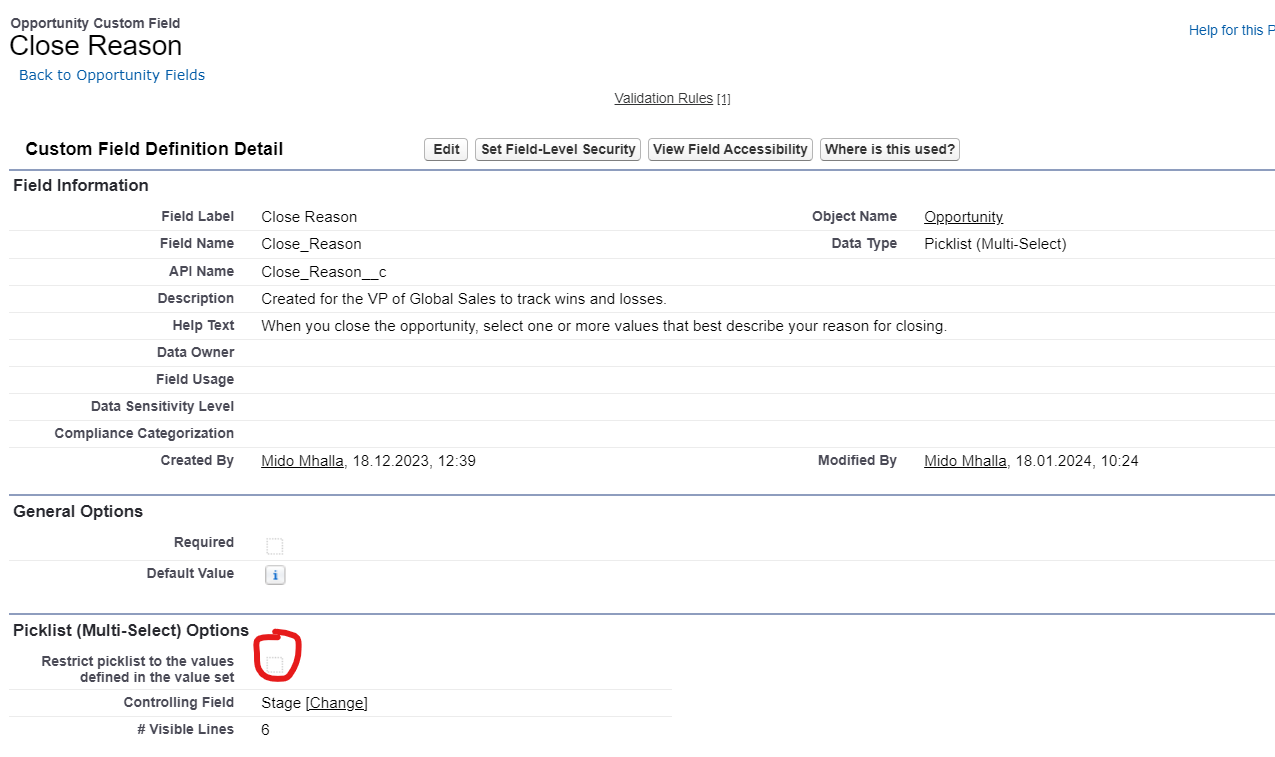
Uncheck the restriction as shown above
Fix 2 — Check Field Dependencies
Next, verify that the dependency settings include all needed values.
- Go to Setup
- Open Object Manager
- Select Opportunity
- Open Field Dependencies
- Edit the related field dependency
- Make sure all Closed Won and Closed Lost values are included
- Save
Final Step
After making these two changes, go back to Trailhead and click Check Challenge again.
In most cases, this resolves the issue and the challenge passes successfully.
Reference
You can also check the original discussion here:
Trailhead Community Discussion
← Back to Apex